

AI for Sales Leaders: The 5-Tool Stack That Saves Me 6 Hours Weekly
Most AI stack posts are wish lists. This is an audit—what actually touches my week managing 9 quota-carrying reps.

The AI Sales Lab helps B2B sales professionals build confidence using AI in their daily work. I’m Florian, Head of DACH at a 10M€+ ARR platform managing 9 quota-carrying reps.
When I moved from carrying quota to managing a team, my time disappeared. Same hours, 9x the surface area. I couldn’t out-work the problem. I had to out-system it.
I run 5 AI tools weekly. They save me roughly 6 hours. This isn’t a wish list—it’s an audit of what actually runs, including three tools I abandoned.

🎯 THE ONE THING
My AI stack as a sales leader
Most “AI stack” posts read like shopping lists. “I use ChatGPT for emails, Notion AI for notes, and this new tool I got a discount code for.”
That’s not a stack, feels like a collection.
A stack has layers.
Each layer solves a specific problem.
The layers connect.
Here’s the honest truth about mine:
I’m not authorised to use some AI-Tools (like Claude) on company data. Corporate policy.
So this stack isn’t about automating CRM workflows or running pipeline analytics through Claude.
Three things i try to achieve with my stack:
Staying informed without drowning
Enabling my team without micromanaging
Protecting my thinking time
Let me walk you through what actually runs.
The Morning Layer — Staying informed without the scroll
The problem: Industry news. Competitor moves. Podcast drops. Platform activity. Customer updates… too much information to process.
Manually scanning all of this? Over an hour daily. I don’t have that hour.
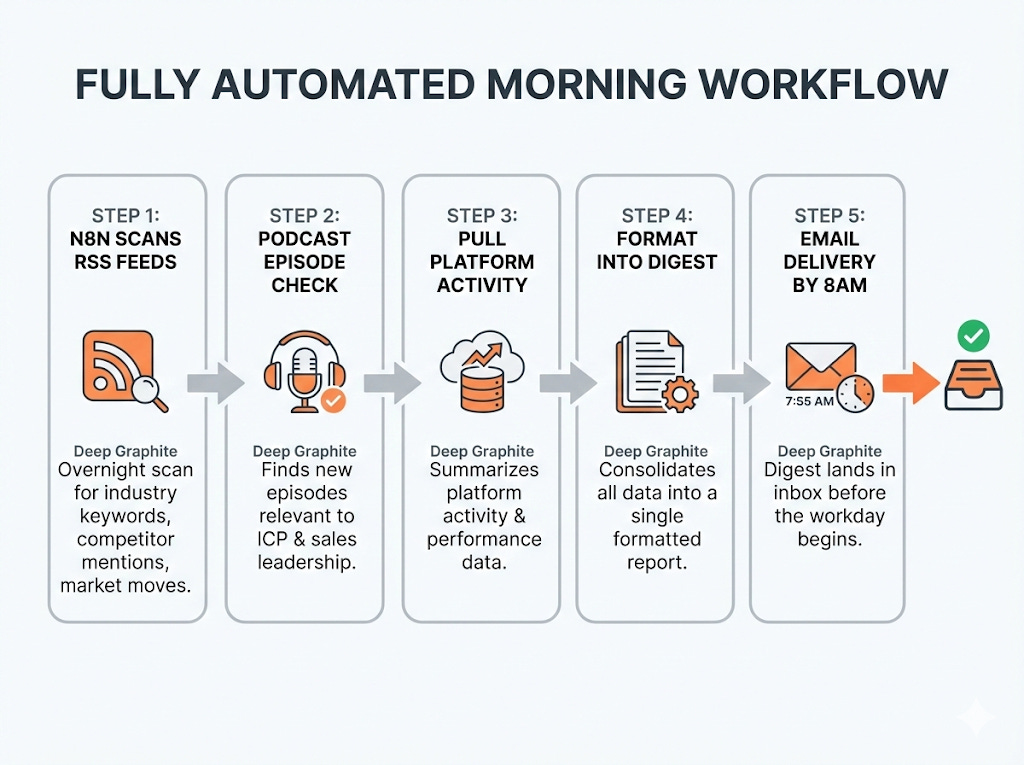
The workflow:
N8N scans RSS feeds overnight—industry keywords, competitor mentions, market moves
N8N checks for new podcast episodes relevant to my ICP and sales leadership
N8N pulls a summary of platform activity
Everything gets formatted into a single digest
Digest lands in my inbox before 8am in my Inbox.
The reality: I read it 4 out of 5 days. Tuesdays are a write-off—back-to-back meetings from 8am. That digest sits unopened until Wednesday, if I’m honest.
During the other days I’m informed before my first coffee.
I know what happened in my market.
I know which customers had activity.
I know if a competitor made noise.
Time math: ~1 hour daily compressed into a 5-minute scan. That’s 4+ hours back every week.
The Learning Layer — Podcasts → team intel
The problem: Great sales podcasts exist. 30 Minutes to President’s Club. The Game with Alex Hormozi. The Advanced Selling Podcast. Dozens more.
No time to listen to all of them. So insights get lost. Tactics that could help my team never reach them because I didn’t have 45 minutes to listen and take notes.
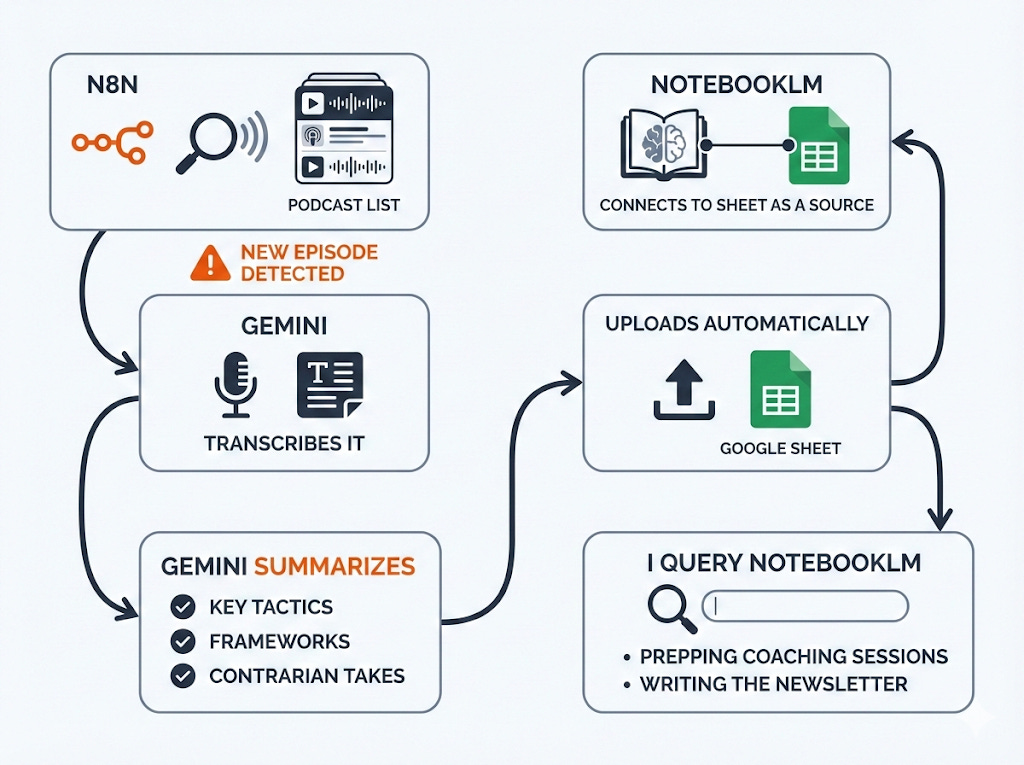
The workflow:
N8N scans for new episodes from my podcast list
New episode detected → Gemini transcribes it
Gemini summarizes: key tactics, frameworks, contrarian takes
Summary uploads automatically to a Google Sheet
NotebookLM connects to that Sheet as a source
I query NotebookLM when prepping coaching sessions or writing the newsletter
What this enables: I sound like I listened to 10 podcasts this week. I didn’t. I read 10 summaries and went deep on 2.
When a rep struggles with discovery questions, I search my NotebookLM: “discovery frameworks from the last 3 months.” I get back specific tactics from specific episodes. I share the best one in our 1:1. We try it together the following week.
The compounding effect is real. I’ve been running this for months. My database now has hundreds of extracted tactics, tagged and searchable. The newsletter you’re reading right now pulls from this same source.
The Enablement Layer — What I built for reps
The problem: Rep has a customer call in 30 minutes. They need context.
What do they do? Click through CRM tabs. Open old opportunities. Scroll through activity history. Read notes from 8 months ago written by someone who’s no longer at the company.
Takes 15-20 minutes. They still miss half the context.
Worse: when someone’s sick, the covering rep starts from absolute zero. “So... what’s the deal with this account?” And I’m the one answering that question five times a week.
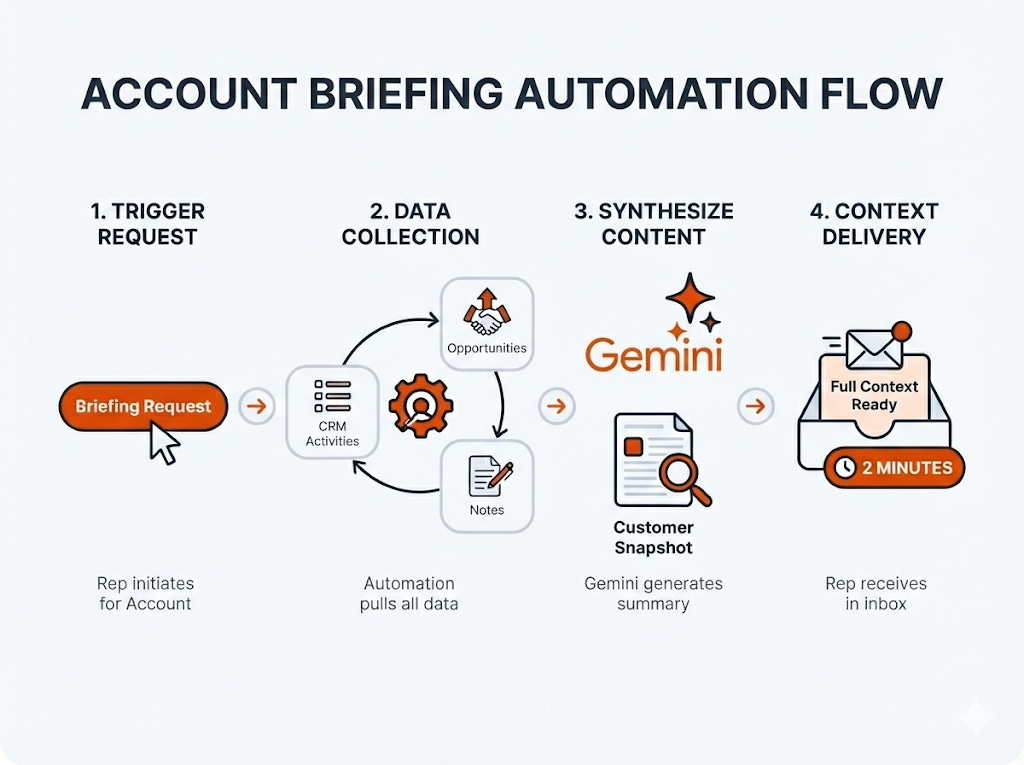
The workflow:
Rep triggers a briefing request for a specific account
Automation pulls all activities, opportunities, and notes from CRM
Content gets synthesized into a “what happened with this customer” snapshot
Rep gets full context in 2 minutes
What this enables: Reps show up informed. They reference the last conversation accurately. They know the open issues without asking.
Coverage handoffs don’t start with confusion. When Maria covers for Stefan, she has the same context Stefan had. Maybe better—because the briefing catches things Stefan forgot.
And I’m not the institutional memory anymore. The system is.
The Writing Layer — Claude + Napkin
The problem: Newsletter. LinkedIn. Coaching frameworks. Team playbooks. All need writing and visuals.
I have ideas. Turning ideas into polished content takes time I don’t have.
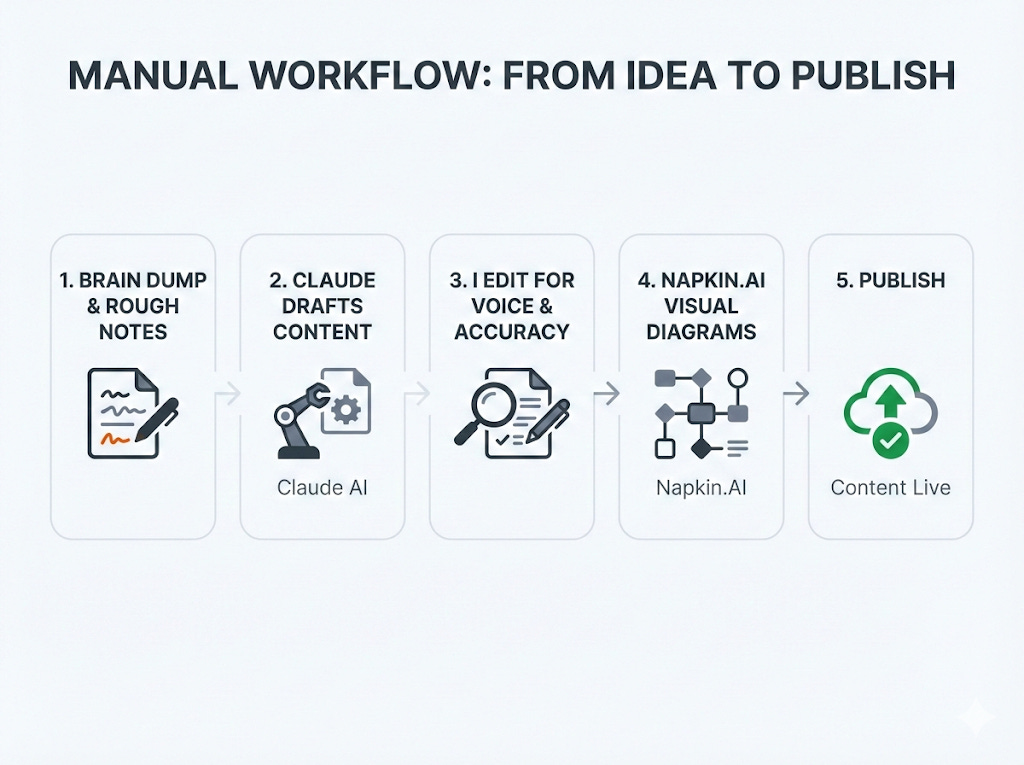
The workflow:
Brain dump or rough notes into Claude
Claude drafts structured content
I edit for voice and accuracy
Napkin turns key frameworks into visual diagrams
Publish
The honest note: Claude isn’t in my work stack. Company policy—no company data into external AI tools. So Claude only touches personal content: this newsletter, LinkedIn posts, frameworks I’m developing.
But it’s where most of my “thinking time” happens. The draft gets my thoughts out of my head. The edit is where I sharpen the argument. Without Claude, I’d publish half as often at twice the effort.
Napkin is newer in my stack. When a concept needs to be visual—a workflow, a framework, a process—Napkin gets me 80% there in minutes. The visuals you see in this newsletter? That’s the combo working.
What’s still manual
AI doesn’t touch everything. Some things shouldn’t be automated.
1:1 prep: Too nuanced. What we discussed last week, what’s weighing on this rep specifically, what feedback I need to deliver. This changes weekly. No system captures it.
Deal judgment calls: AI can surface data. It can flag patterns. It can tell me which deals haven’t had activity in 10 days. It can’t tell me whether this specific deal is worth fighting for or should be qualified out. That’s judgment. That’s mine.
Difficult conversations: No automation for delivering hard feedback. No prompt that handles “your performance isn’t where it needs to be.” That’s human work.
The stack handles information. Decisions stay human.
The Graveyard — What I abandoned and why
Not everything survives. Three tools I tried and dropped:
ChatGPT — I used it for general writing and research before switching to Claude. Same prompts, noticeably worse results. The outputs felt generic, needed more editing, and didn’t match my voice. Replaced entirely.
Hunter.io — Tried it for email finding. The free tier hit its limit within days. Paid tier didn’t justify the cost for my prospecting volume. Dead on arrival.
Clay — This one hurt. The results are genuinely impressive—enrichment, workflows, data quality. But the credit logic is brutal. Burns through budget fast. For what I needed, the economics didn’t work. Maybe revisit when the team scales.
The lesson: Shiny tools die fast when the economics don’t work or the output disappoints.
I have a simple filter now: Does this tool save me more time than it costs to maintain? If I have to think about credits, fight with limitations, or redo AI outputs constantly—it’s gone.
The tools that survive are boring. They run in the background. They don’t need babysitting. They just work.
⚡ QUICK WIN OF THE WEEK
Build the podcast intelligence pipeline
You don’t need my full stack. Start with this one workflow:
What it does: New podcast episode drops → you get a searchable summary without listening.
Setup (one-time, ~2 hours):
Create RSS feed list for 3-5 sales podcasts you wish you had time to follow
N8N / Make workflow: trigger on new RSS item
Send audio to Gemini for transcription
Second Gemini call: summarize key tactics, frameworks, and contrarian takes
Output uploads to Google Sheet (columns: date, podcast, episode title, summary, key tactics)
Connect Google Sheet as a source in NotebookLM
Ongoing (10 min/week):
Skim the Google Sheet for interesting summaries
Query NotebookLM when you need specific insights
Test one tactic with your team per week
The payoff: In 3 months, you’ll have a searchable database of hundreds of sales tactics. Your coaching gets sharper. Your content gets easier. And you never missed an episode—even though you didn’t listen to any of them.
📚 WHAT I’M READING/LISTENING TO
📖 On Lauren Szuchan’s latest edition covered what calling actually does that email can’t. Short & very valuable read!

Jiri is not often publishing things in English, but when he does, it’s extra gold.
SIGN-OFF
Your stack doesn’t need to look like mine. But it needs to solve real problems you actually have.
Start with one workflow. The podcast pipeline is a good entry point—low risk, clear payoff, and you’ll learn how the tools connect.
Then ask yourself: What’s the next hour I can get back?
Hit reply and tell me what you’d automate first. I read every response.
Florian
P.S. The tools that stick are boring. They run without you thinking about them. If you’re constantly tweaking, fighting limitations, or redoing outputs…that’s not a stack. That’s a hobby. Kill it and move on.
I like the morning layer. What do you mean specifically when you say "platform" in step 3?
This is super helpful! Also, would love to know the list of podcasts you follow? 😊